The discipline of turning complex enterprise data into interfaces people actually use every day, not just deploy.
Dashboard interface design is the practice of building interactive data products that let enterprise teams monitor KPIs, investigate anomalies, and take action from a single screen without switching between tools or waiting on analyst reports. The work requires data architecture, role-based access logic, and real-time performance engineering alongside the visual layer, and most projects that struggle in production do so because those underlying decisions were made too late.

Icon-only navigation penalizes infrequent users.
A labeled icon, where a small graphic is paired with a one or two word text description, removes guessing entirely. In enterprise dashboards where some users access the product only a few times per week, labeled icons reduce support requests and shorten onboarding time. The trade-off is screen space, and in data-dense layouts that trade-off needs to be measured against the real frequency of user confusion on each specific navigation element.
The strongest pattern for dashboard navigation is a left sidebar with labeled icons for primary sections and an expandable sub-menu for secondary views. This structure gives users a persistent orientation reference without consuming horizontal space needed for data display.
Accessibility testing should verify that every icon has a text equivalent visible to screen readers, and that icon-label pairs maintain sufficient contrast on both light and dark interface themes.
Color systems for data interfaces
Color in dashboards serves a functional role before a visual one.
Red, amber, and green status indicators carry meaning that users process faster than any text label. Sequential color scales communicate magnitude in heatmaps and choropleth map views. Categorical palettes distinguish data series in multi-line charts and grouped bar graphs.
The constraint is accessibility: roughly 8% of male users have some form of color vision deficiency, which means any interface that relies on color alone to communicate data status fails for a significant share of its audience. Pairing color with shape, pattern, or position eliminates that failure point without reducing the speed at which users with full color vision can scan the display.

Understanding the user's context before choosing a layout

A dashboard exists to reduce the time between seeing a problem and acting on it.
That reduction only happens when the interface is built around the user’s actual decision-making context, not around the data structure underneath. The same dataset presented to an operations lead, a finance director, and a compliance officer needs three different default views, three different drill-down paths, and three different definitions of what counts as an anomaly worth flagging. Research before layout is the sequence that determines whether a dashboard becomes a daily tool or an expensive screenshot.
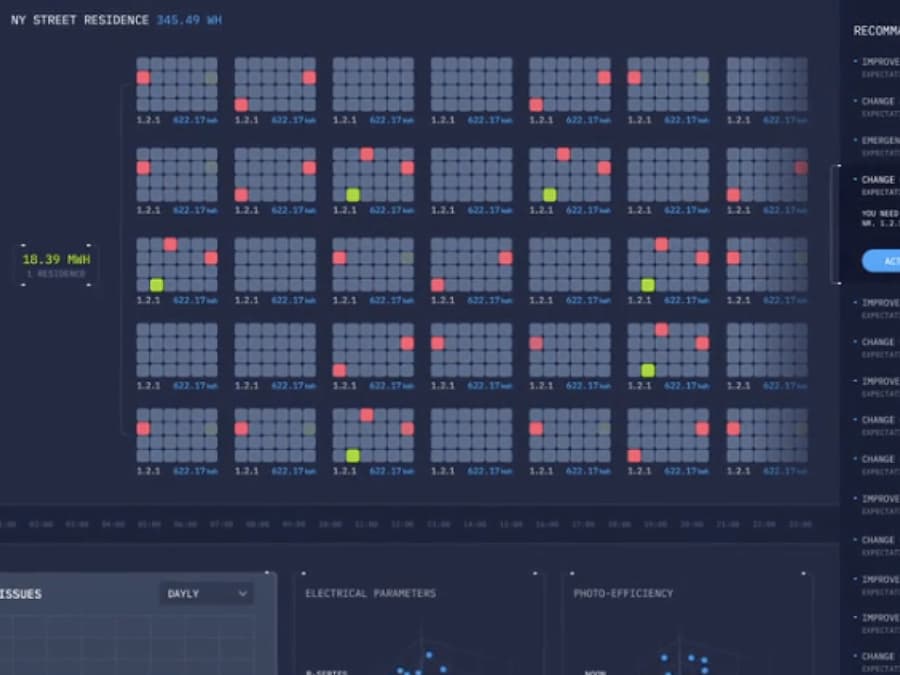
SunSniffer solar monitoring dashboard
Centralized performance monitoring across large-scale solar arrays.

Frequently Asked
Questions
Common questions about dashboard interface design, project scope, deliverables, and long-term maintenance.
What types of dashboards do you design?
The portfolio covers analytical, operational, and executive dashboards across healthcare (EHR systems, patient monitoring), transportation (GPS, fleet management), financial services, supply chain, and AI/ML platforms. Specific project types include pharmaceutical disease monitoring, solar array performance tracking, real-time fleet telematics, clinical AI recommendation interfaces, and augmented reality heads-up displays for automotive navigation.
What is your process for gathering requirements?
Dashboard projects start with a discovery phase that maps data sources, user roles, and business objectives before any design work begins. User personas and workflow touchpoints are developed from interviews and existing usage data. The output is a prioritized list of metrics per user role, which determines what each person sees on first load and which drill-down paths the interface needs to support.
Will the dashboard design be responsive and adaptive?
Dashboard interfaces are designed for both responsive and adaptive behavior depending on the project. Responsive design stacks and reflows content across screen sizes. Adaptive design creates device-specific layouts that address usability problems particular to each screen dimension, so the experience feels intentionally designed rather than compressed from a desktop view.
Do you provide wireframes, mockups, and interactive prototypes?
The process includes wireframes to define structural layout, high-fidelity mockups for visual and interaction design, and interactive prototypes that simulate the final product without code. Prototypes allow user testing and stakeholder review before development starts, which catches layout and workflow problems at the cheapest possible stage to fix them.
How many design iterations or revisions are included?
The design process is iterative throughout, with refinement happening based on testing and feedback rather than in a single revision cycle at the end. If the first two weeks of work do not meet expectations, clients can walk away with no obligation. That guarantee exists because iterative testing during the project consistently produces better results than stacking revisions at the end.
Can you integrate with our existing data sources?
Dashboard projects include data source mapping, backend architecture for data processing, and integration of identified sources into the dashboard system. API testing verifies that integrated components interact correctly, particularly when calculations or aggregations happen server-side before reaching the display layer. Compatibility between data source formats and dashboard requirements is resolved during the architecture phase, before visual design begins.
Do you conduct usability testing?
Usability testing runs throughout the project, not only at the end. Real users interact with prototypes and provide feedback on layout, workflow clarity, and data comprehension. Testing also covers functionality, performance, and cross-device behavior, with the goal of identifying where users hesitate, misread data, or abandon a task before the interface reaches production.
How do you handle data security and privacy?
Data security is addressed at the architecture level, not as a final review. For healthcare dashboards, HIPAA compliance shapes decisions about authentication, session management, audit logging, and role-based data access from the first sprint. Integration checks and security testing run before launch to verify that data handling meets regulatory requirements and that access controls enforce the intended permission structure.
What deliverables do we receive?
Deliverables include a documented design system with reusable components and patterns, wireframes, high-fidelity mockups, interactive prototypes, and detailed specifications for developer handoff. If development is included in scope, the deliverable extends to functional code. The design system documentation is built to be detailed enough for a development team to add new dashboard views without the original design team being involved.
What is the typical timeline?
A medium-complexity dashboard typically takes 8 to 16 weeks from discovery through design delivery. Timelines vary based on the number of data sources, user roles, and compliance requirements. Projects with HIPAA or Section 508 mandates add two to four weeks for documentation and accessibility validation.
Can the dashboard support different user roles?
Role-based views give each user type a different default screen, different available filters, and different drill-down paths based on their function. An operations lead, a finance director, and a compliance officer looking at the same underlying data each see a view built for their specific decisions. Context-sensitive navigation shows controls only when they are relevant to the current user’s role and task.
What post-launch support do you offer?
Post-launch support covers bug resolution, metric additions or removals, and adaptation as business priorities shift. The delivered design system is built so that internal teams can extend the dashboard independently for routine changes. For larger updates like new data source integrations or new user roles, ongoing design support is available on a retained or project basis.
How do you handle scalability?
The design system and backend architecture are built to accommodate growth in both data volume and user count. Component-based design means new views can be assembled from existing parts without redesigning the underlying system. Backend architecture is tested against projected data loads to verify that performance does not degrade as concurrent users or data sources increase over time.
What type of interfaces can be built in this new era?
Current dashboard interface types include real-time operational views for live monitoring, predictive analytics panels pulling from multiple APIs, and automated inventory and supply chain management dashboards. Emerging categories include augmented reality heads-up displays, voice-driven data query interfaces, CLI-based developer dashboards, and MCP-based agent interfaces that combine multiple data tools into a single conversational interaction layer. Each type requires different interaction patterns, data refresh strategies, and input methods.
How is Fuselab different than other companies?
The deliverable is a complete design system that functions as a framework for building and extending dashboards over time, not a set of static screen designs. A custom data visualization component library is built per project rather than adapted from generic templates. Clients have real-time access to design files, project scheduling, and communication channels throughout the engagement, and the documentation is detailed enough that internal teams can iterate independently after handoff.